Measure the roof.
Review roof surface areas and pitches in a labeled model, with measurements your team can use for estimating.
Roof and exterior measurements. 3D models. Sales. Permits. Projects. Bring the tools you use every day into one connected remodeling platform—from finding the next customer to paying the crew.
Make and receive browser calls, route incoming calls, review voicemail, and follow up by text or email. Keep communication alongside the people your team is trying to reach.
Separate phone, texting & email tools
Today, 9:41 AM · 4 min 12 sec
Interested in a kitchen remodel. Confirm the consultation and ask about the existing layout.
Calling, messaging, and email require connected services. Setup and usage charges are scoped with your plan.
Inside. Outside. The whole business.
Roof measurements, exterior reports, and dimensioned 3D models—connected to the CRM where you price, propose, and manage the job.
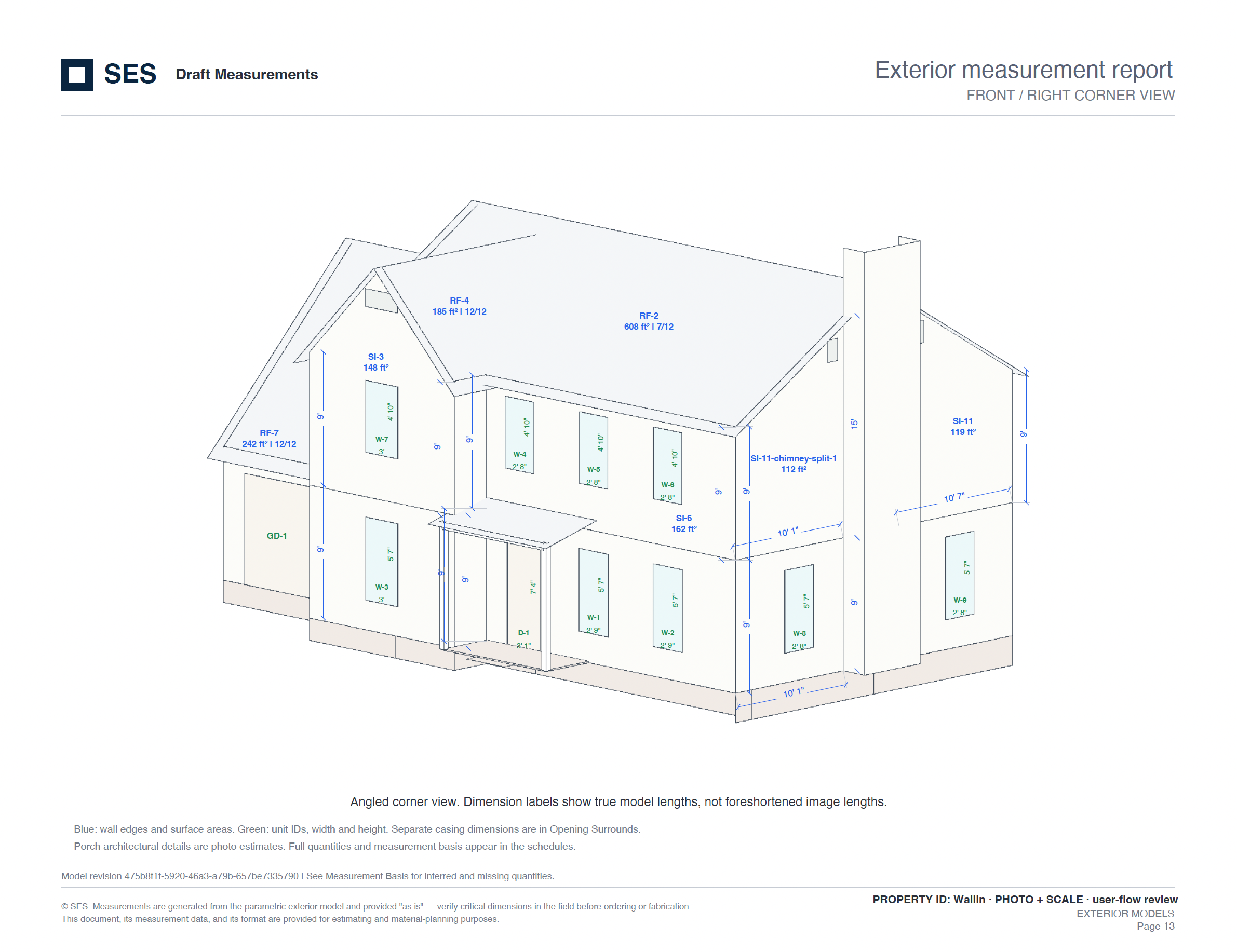
Review roof surface areas and pitches in a labeled model, with measurements your team can use for estimating.
Bring wall dimensions, surface areas, and window and door measurements together in one exterior report.
See how the roof, walls, and openings fit together in a dimensioned 3D view. Use it to explain the scope and plan the work.
Measurements support estimating and material planning. Verify critical dimensions in the field before ordering or fabrication.
The core of the CRM connects the work before, during, and after the sale. Explore the Main Flow using one fictional kitchen-remodel opportunity.
Keep customer contact details and the relationships to their opportunities, appointments, sales, and projects in one place.
An illustrative customer journey, not a mandatory sequence. Lead sources provide attribution; follow-ups and opportunities can recur as the relationship develops.
You shouldn’t have to move the same customer through a phone app, a spreadsheet, an estimating tool, and a job board just to get a project built.
| What you may use today | Inside Remodeler 365 |
|---|---|
| Phone system + text messaging | Browser calling, routing, voicemail, texts, and communication history |
| Mapping + canvassing spreadsheets | Assigned territories, appointment pins, rep filters, and field activity |
| Presentation + estimating software | Guided sales appointments, measurements, pricing, and proposals |
| Separate visualization workflows | Project models, finish selections, framing views, and customer render sharing |
| Permit-prep folders + plan trackers | Preliminary drawings, details, checklists, takeoffs, and review corrections |
| Reporting + commission spreadsheets | Custom reports, marketing ROI, sales goals, and commission summaries |
| Separate website analytics dashboards | Connected Google Analytics traffic, pages, channels, events, and conversion funnels |
| Ad dashboards + social publishing tools | Google and Meta reporting, lead-source tracking, marketing spend, and social posts |
| Job boards + disconnected calendars | Appointments, crew scheduling, project activity, and job status |
| Bid spreadsheets + contractor email chains | Quote requests, award workflows, contractor compliance, and dedicated job portals |
| Training folders + recruiting trackers | Learning paths, team training, candidate tracking, and recruiting templates |
Consolidate the day-to-day work. Keep the specialist services you need. We’ll map your current tools to the CRM during your demo and confirm what can be replaced, connected, or retained.
Show us your current setupConnected services can carry separate charges. Commission reporting is not a replacement for payroll tax filing or general accounting, and permit preparation does not replace licensed design or jurisdiction review.
Each team gets the tools for its part of the job, with the customer and the project at the center.
Review campaigns, record spend, work territories, and manage social posts. Follow the lead source through appointments and sales.
Guide the conversation from your presentation and product demo through measurements, price delivery, and the contract.
Use project templates, activity schedules, contractor assignments, and job portals to coordinate the work after the sale.
Scheduling is only one part of managing a team. Remodeler 365 brings field coordination, training, organizational structure, commission summaries, and career development together.
Bring field activity, territories, and calendars into the same operating rhythm.
See it with your team structureTrack the activity your field team generates and keep it connected to the opportunity.
Draw and assign areas, locate appointments, and filter by representative or result.
Manage appointments, staff schedules, event types, templates, and scheduling rules.
Payroll Center provides commission and payout summaries. Use your payroll and accounting providers for tax filings and other statutory processing.
Bring connected Google Analytics reporting into the CRM. See how people find your website, which pages they visit, and where they take the next step.
Requires a connected GA4 property and configured tracking. Analytics reports are aggregated; recorded events and CRM attribution may differ.
| Channel | Sessions | Share |
|---|---|---|
| Organic search | 960 | 40% |
| Paid search | 720 | 30% |
| Social | 480 | 20% |
| Direct / other | 240 | 10% |
See the mix of traffic arriving at your website.
Combine synced ad costs, dated expenses, and cost-per-result rules. Review spend by source, then inspect the attributed leads, appointments, and sales behind the total.
Bring connected Google and Meta ad costs into the reporting period.
Record dated source expenses such as a home-show fee or a campaign charge.
Set source rates per lead, appointment, demo, or sale with effective dates.
| Source | Cost basis | Spend | Leads | Cost / lead |
|---|---|---|---|---|
| Google Ads | Synced ad costs | $2,200.00 | 22 | $100.00 |
| Meta ads | Synced ad costs | $1,000.00 | 10 | $100.00 |
| Home show | Manual expense | $600.00 | 8 | $75.00 |
| Referral partner | 20 leads × $60 | $1,200.00 | 20 | $60.00 |
The CRM’s source detail shows attributed leads and how appointments and sales connect back to them. Marketing Cost & Conversion ROI reporting uses these cost inputs to make performance easier to evaluate.
Review automatic, manual, and calculated costs together. Source matching and attribution need to be configured; unmatched campaign spend remains visible rather than being assumed to have generated a sale.
Interactive figures are a fixed sample, not connected advertising data or promised results. Advertising charges remain separate from the CRM subscription.
Bring your lead sources and spend model to the demoRunning the business means hiring the right people and seeing how the work performs. Those workflows belong here, too.
Keep candidates, positions, sources, assigned staff, and hiring activities together. Apply recruiting templates and see who is ready for the next conversation.
Sales representative
Assigned · Next activity setProject coordinator
Assigned · Next activity setField marketing
Assigned · Next activity setCandidate tracking · Hiring stages · Recruiting templates · Interview activity
Build and save reports, compare lead sources and marketing spend, track goals, and review commission and payout summaries by individual, role, market, or period.
See the source behind the result.
Custom reports · Marketing ROI · Sales performance · Goals · Commission summaries
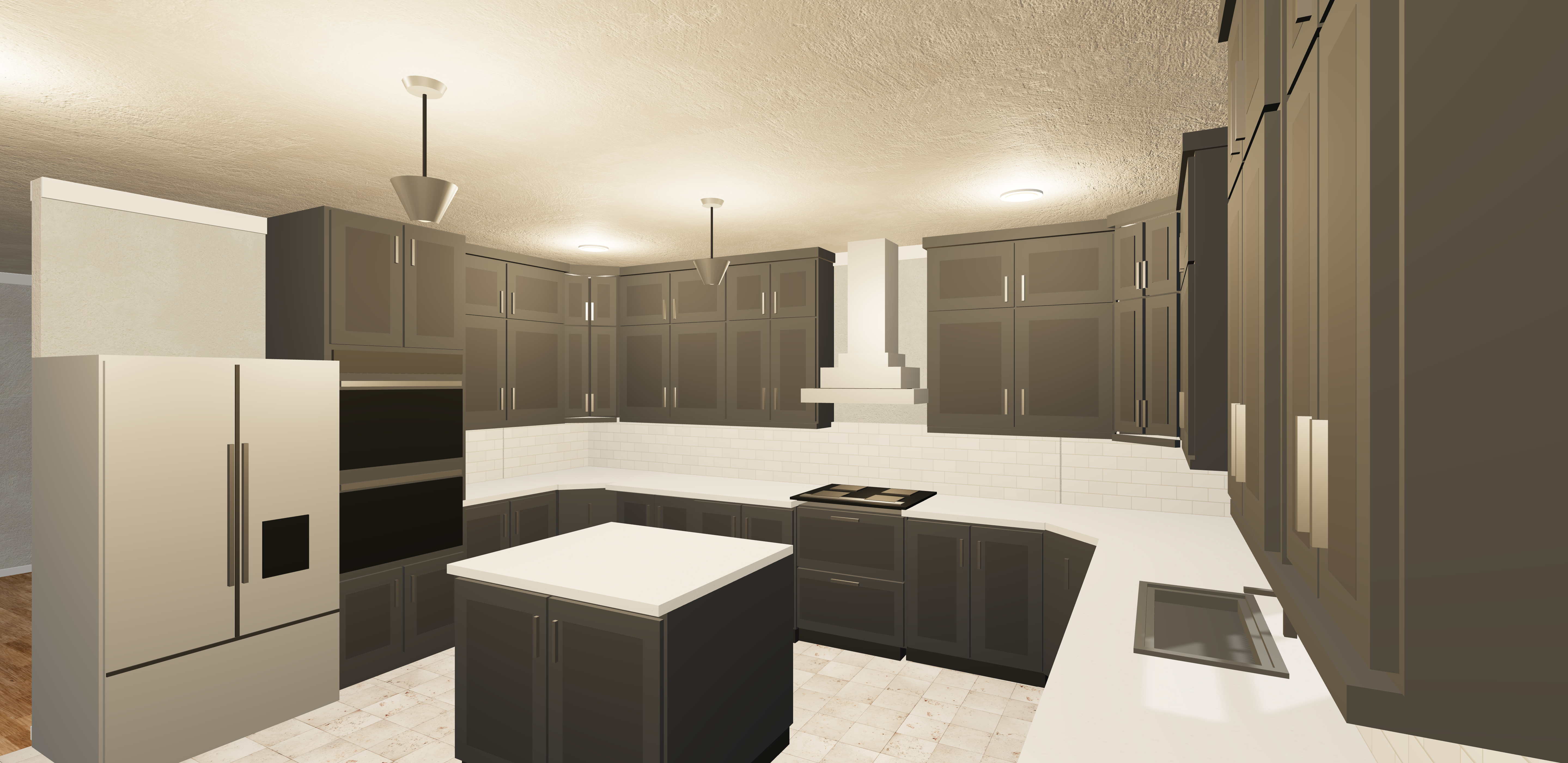
From a kitchen layout to the full exterior, show customers what you are planning. Explore actual Web 3D captures from Permit Center.
Cabinet layout, island, counters, appliances, and lighting shown together in Web 3D.
Use Web 3D to discuss layouts and finishes, then continue in Permit Center with preliminary drawings, details, material takeoffs, and review checklists.
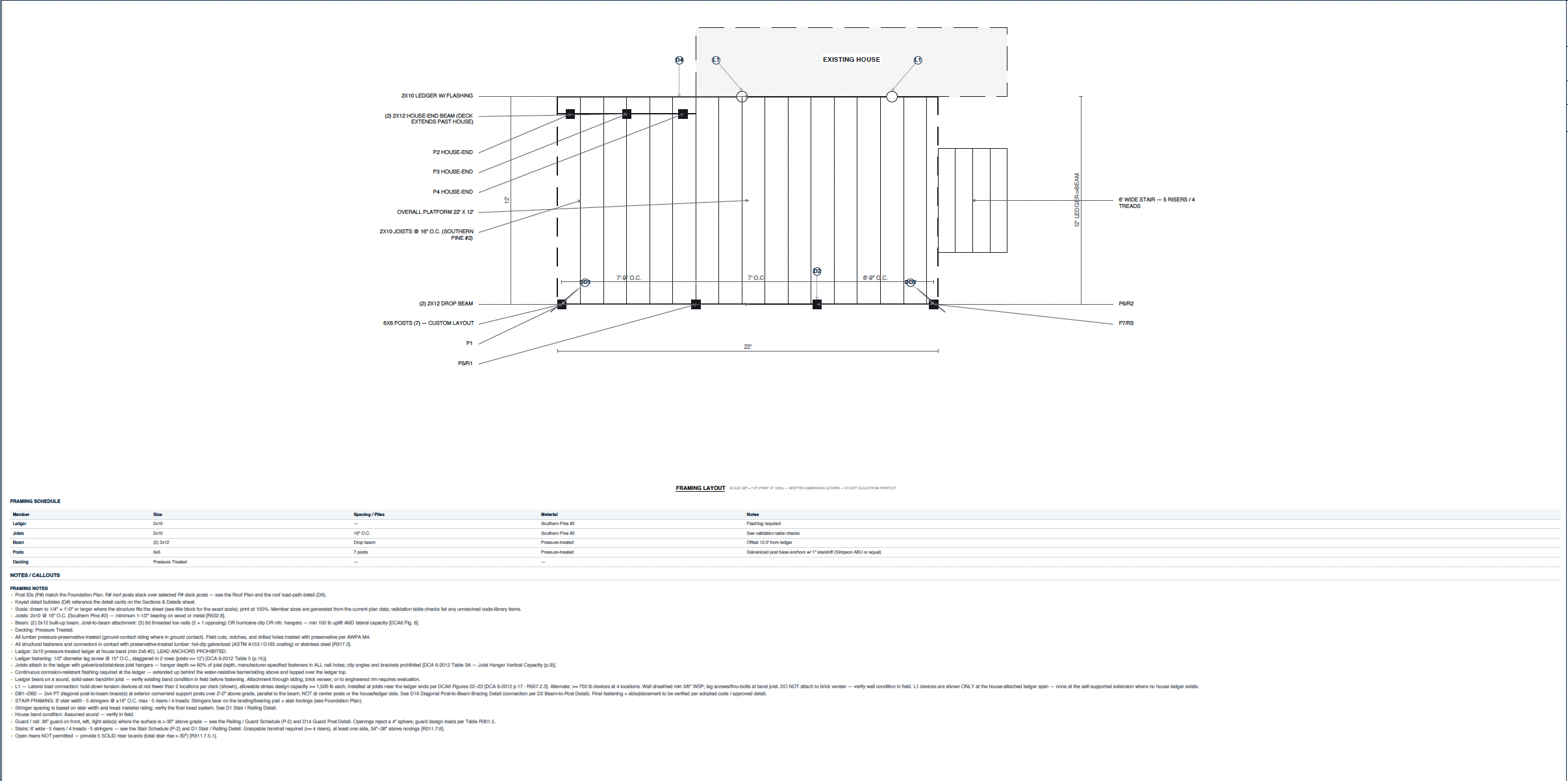
Review the joist layout, post locations, stairs, dimensions, framing schedule, and notes together. This deck drawing is a separate example from the kitchen visualization.
Open the full framing planWeb 3D images are user-supplied screenshots, not photographs or a live viewer. Final plans need the applicable professional review and local approval before construction.
The work around the job matters just as much as the job itself. Bring sales, field operations, design, production, and management into the same platform.
Prospects, sources, appointments, pending follow-ups, and your sales pipeline.
Browser calling, routing, voicemail, a shared phonebook, and message templates.
Marketing territories, assigned reps, appointment locations, and field results.
Presentations, measurements, pricing, financing options, and contract workflows.
Roof areas and pitches, exterior wall and opening measurements, reports, and dimensioned 3D models.
Exterior and interior views, walkthroughs, finishes, and customer render sharing.
Preliminary plan sets, site-plat markup, framing, details, checklists, and takeoffs.
Review, annotate, highlight, add text, and work with signatures in PDF documents.
Job status, crew assignments, activities, project templates, and appointments.
Proposals, quote responses, awards, compliance documents, and project portals.
Connected Google Analytics: traffic, landing pages, channels, devices, engagement, events, and conversion funnels.
Saved reports, lead-source performance, marketing spend, ad reporting, and goals.
Project costs, receipts and adjustments, commission rules, and payout summaries.
Candidate records, hiring stages, assigned staff, interviews, sources, and recruiting templates.
Learning paths, team training, reusable lessons, and role-based development.
Staff, organizational structure, market segments, career milestones, and access templates.
Remodeler 365 grew out of the CRM built for SES Custom Homes—the leads to follow up, the estimates to get out, and the jobs to keep moving.
Now we’re opening the conversation with other remodeling companies. See how it works, tell us what your team needs, and help shape what comes next.
Have something else in mind?
Ask Rick directly
Yes. Explore roof areas and pitches, exterior wall dimensions and areas, window and door measurements, and dimensioned 3D exterior models. Ask to see a sample report in your demo. Verify critical dimensions in the field before ordering or fabrication.
It can consolidate many everyday workflows: calling, texting, field mapping, sales demos, estimates, project coordination, contractor communication, and reporting. In your walkthrough we will compare your actual software with the CRM and confirm what can be replaced, connected, or retained.
Those workflows are built into the platform. Connected phone, email, ad, and social accounts need setup and permissions. The proposal will spell out enabled features, service charges, and any usage costs; advertising spend remains separate.
Permit Center prepares preliminary drawings, details, schedules, material takeoffs, package checklists, and review corrections. It does not issue permits or replace the professional review, engineering, field verification, and local approval your project requires.
Both. The CRM includes service-based workflows for kitchens, bathrooms, additions, roofing, siding, windows, and other home improvements. Your demo can focus on the services you sell.
We are introducing Remodeler 365 to a small group of remodeling companies. Start with a personal walkthrough so we can understand your workflow and discuss whether a pilot is a good fit.
Company branding is part of the setup conversation. We will review your logo, business details, services, and document requirements before agreeing on your pilot scope.
Pricing is discussed after we understand your team, setup needs, and the features you plan to use. You will receive a proposal covering setup, the ongoing subscription, and support before committing.
We can review your existing system or spreadsheet exports during onboarding. Import scope and any cleanup work are agreed before moving your data.
Tell us what you use for marketing, calling, sales, design, roof and exterior measurement reports, 3D models, projects, contractors, and reporting. We’ll build a walkthrough around the tools and handoffs you want to bring together.
Planning a new kitchen? Explore the design, compare finishes, and see the idea before construction begins. Let’s talk about your next project.
Create the post.
Choose the channel.
Keep track of it.
Manage Facebook and Instagram publishing from the Social Media workspace. Add copy and media, choose the channel, and review what happened after you publish.
Channels require account connections and permissions. Publishing and scheduling options depend on the selected platform. Nothing is posted from this example.